OpenAI shipped ChatGPT Images 2.0 (model code gpt-image-2) on April 21, 2026 — a ground-up upgrade to its image stack that adds Thinking mode, native multilingual text rendering, 2K resolution, and 8-image coherent batches with character and object continuity. For B2B teams, it closes the last real gap between "AI image" and "production-ready visual asset" — usable for infographics, slide decks, marketing mockups, LinkedIn headshots, and report covers without the hand-editing loop. This guide unpacks what shipped, how it compares to gpt-image-1 and Google's Nano Banana Pro 2, and includes 40 ready-to-paste prompts for marketing, product, sales, and content teams.
Key takeaways
- ChatGPT Images 2.0 (gpt-image-2, launched April 21, 2026) adds Thinking mode, native multilingual text rendering, 2K resolution, and 8-image coherent batches with character and object continuity.
- For B2B teams it closes the gap between an “AI image” and a production-ready asset — usable for infographics, decks, marketing mockups, headshots, and report covers without manual rework.
- The guide includes 40 ready-to-use B2B prompts and a side-by-side with Google’s Nano Banana Pro 2 to help you pick the right tool per use case.
What Is ChatGPT Images 2.0?
ChatGPT Images 2.0 is OpenAI's third-generation flagship image model, launched on April 21, 2026 and detailed in the official OpenAI announcement. It ships as gpt-image-2 in the public API and is now the default image engine inside ChatGPT, Codex, and Sora. It follows gpt-image-1 (April 2025) and the interim gpt-image-1.5 (December 2025, surfaced inside Codex).
The headline change: Images 2.0 is the first OpenAI image model to think before it draws. Instead of a single diffusion pass, it can plan composition, count objects, verify layout constraints, and consult the web for real-world references mid-generation. The practical consequence for business users is that the image you get on the first try is usually the image you wanted — not the third reroll, not after thirty minutes in Figma patching typos in your infographic.
How ChatGPT Images 2.0 Works
Thinking Mode — The Core Upgrade
Thinking mode is the flagship addition. When enabled, gpt-image-2 runs an extra reasoning pass before it generates any pixels: it decomposes the prompt, plans the layout, counts the objects you asked for, verifies its own output against your constraints, and can search the web mid-generation to pull real-time facts — stock prices, current logos, event dates, sports results — into the image. OpenAI positions this as the feature that makes visuals feel "less AI-generated" and closer to what a designer would produce after reading a brief. In practical terms, Thinking mode cuts the number of rerolls you burn on wrong object counts, mislabeled diagrams, or layout drift.
Thinking mode is available on Plus ($20/mo), Pro ($200/mo), Business, and Enterprise subscriptions. Free ChatGPT users get the base gpt-image-2 model without the Thinking pass. This tier gap is the single most important line item on any AI budget review if images are part of your team's output.
Native Text Rendering and Multilingual Output
Text inside images is where the previous generation broke down — Midjourney, DALL·E 3, Flux, and even gpt-image-1 routinely garbled labels, butchered logos, and turned non-Latin scripts into gibberish. Images 2.0 treats type as a first-class citizen. Published blind tests put it near 100% text rendering accuracy, and it now handles Japanese, Korean, Chinese, Hindi, and Bengali natively — not just Latin scripts. For multinational marketing teams, this is the difference between shipping localized creative in-house and paying a localization agency per asset.
Multi-Image Batches with Character and Object Continuity
A single prompt can now output up to 8 coherent images that share the same characters, objects, and scene context. The value becomes obvious on the first run: a 4-panel LinkedIn carousel with the same protagonist across all slides, a case-study storyboard with consistent product visuals, a full before/after/solution/testimonial set for a sales deck — all generated in one shot, no hand-kitbashing in Photoshop, no "this is clearly a different person" disconnect between slides.
Conversational Editing Inside ChatGPT
Images 2.0 keeps the in-chat editing loop that made gpt-image-1 popular. Generate, then iterate in plain English: "make the background darker," "add a third person holding a tablet," "swap the logo for ours at the same size," "move the CTA to the top right." You can upload reference images as style or identity anchors and the model preserves them across edits. One billing footnote worth flagging: reference-image edits are always processed at high-fidelity input rates, regardless of your output quality setting. Bake this into per-image cost forecasts when you plan high-volume iteration workflows.
Availability, API, and Pricing
Images 2.0 is live across ChatGPT (Free, Plus, Pro, Business, Enterprise), Codex, Sora, and the public gpt-image-2 API. Per-image pricing at 1024×1024 lands at roughly $0.006 on low quality, $0.053 on medium, and $0.211 on high. Token rates are $8 per million input tokens, $2 per million cached, $30 per million output. Output resolution scales up to 2K, and supported aspect ratios run from 3:1 landscape to 1:3 portrait — wide enough to cover desktop banners, square social, and mobile vertical with the same model.
ChatGPT Images 2.0 vs gpt-image-1 and gpt-image-1.5
If your team has been using OpenAI's previous image models — the April 2025 gpt-image-1 baseline or the interim gpt-image-1.5 that shipped inside Codex in April 2026 — here is what actually changed, in one table.
| Capability | gpt-image-1 (Apr 2025) | gpt-image-1.5 (Dec 2025) | gpt-image-2 (Apr 21, 2026) |
|---|---|---|---|
| Reasoning before generation | No | No | Yes (Thinking mode) |
| Max resolution | 1024×1024 native | 1024×1536 | 2K |
| Aspect ratios | Limited presets | Standard presets | 3:1 to 1:3 range |
| Multi-image batch with continuity | No | Partial | Yes — up to 8 coherent images |
| Text rendering accuracy | Moderate | Good | Near-100% in blind tests |
| Multilingual scripts | Latin only | Latin + partial CJK | JP / KR / CN / HI / BN first-class |
| Web-search-aware generation | No | No | Yes (via Thinking mode) |
| API price (1024×1024, high) | ~$0.25 | ~$0.23 | $0.211 |
Short version: Images 2.0 is cheaper per image, smarter per prompt, and finally usable for text-heavy business visuals. The jump from 1.5 to 2.0 is larger than the jump from 1 to 1.5 — more like a model generation than a point release.
ChatGPT Images 2.0 vs Nano Banana Pro 2
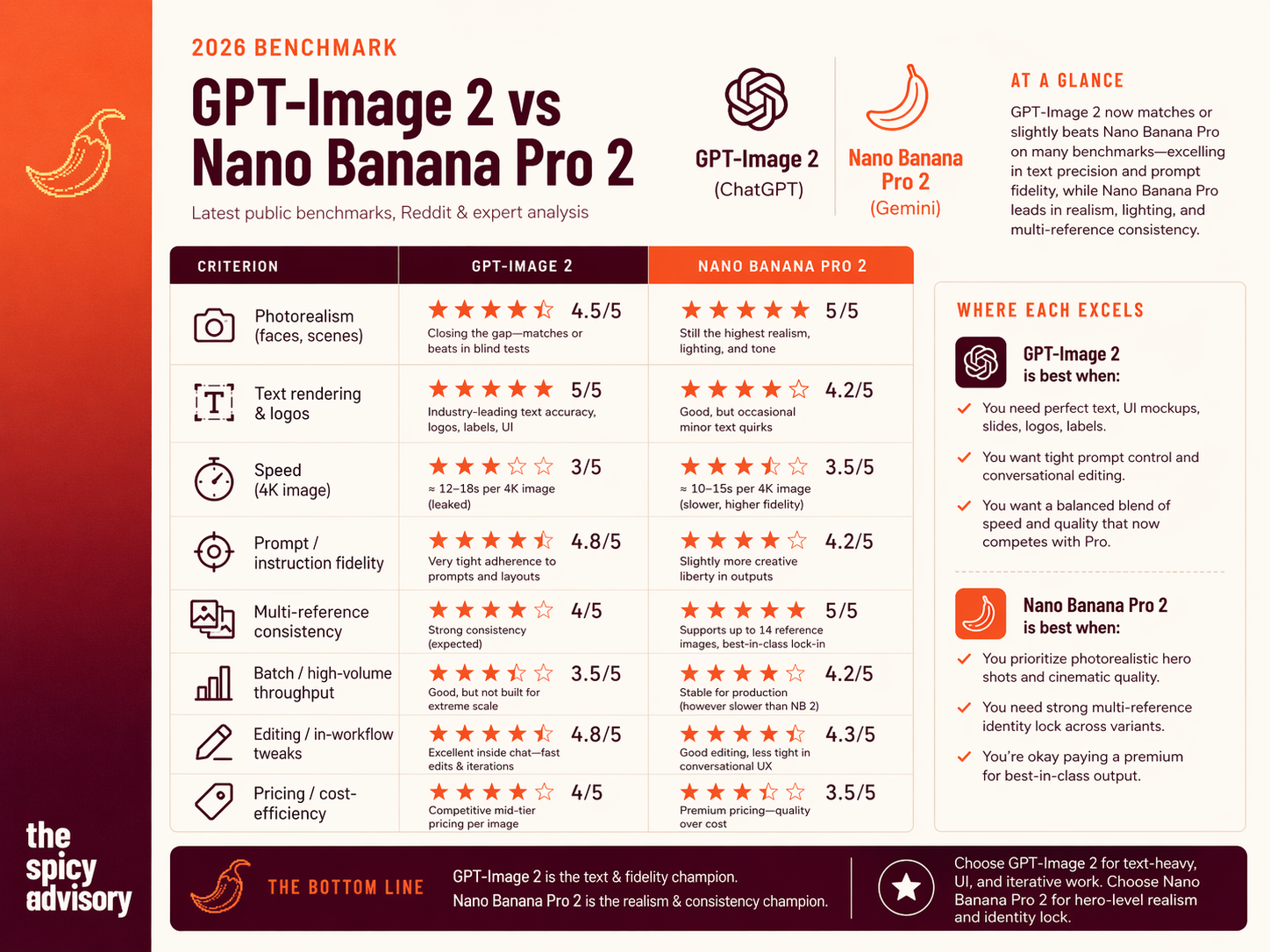
The infographic above summarises where each model lands on the eight criteria that matter for business visuals. The same data is reproduced below as an HTML table for accessibility, AI-overview indexing, and cold sharing.
| Criterion | GPT-Image 2 (ChatGPT) | Nano Banana Pro 2 (Gemini) |
|---|---|---|
| Photorealism (faces, scenes) | 4.5 / 5 — closing the gap, matches or beats in blind tests | 5 / 5 — still the highest realism, lighting, and tone |
| Text rendering & logos | 5 / 5 — industry-leading accuracy for text, logos, labels, UI | 4.2 / 5 — good, occasional minor text quirks |
| Speed (4K image) | 3 / 5 — ~12–18s per 4K image | 3.5 / 5 — ~10–15s per 4K image, higher-fidelity render |
| Prompt / instruction fidelity | 4.8 / 5 — very tight adherence to prompts and layouts | 4.2 / 5 — takes slightly more creative liberty |
| Multi-reference consistency | 4 / 5 — strong consistency across a handful of refs | 5 / 5 — up to 14 reference objects, best-in-class identity lock |
| Batch / high-volume throughput | 3.5 / 5 — good, not built for extreme scale | 4.2 / 5 — stable under production batch load |
| Editing / in-workflow tweaks | 4.8 / 5 — excellent inside ChatGPT, fast iterations | 4.3 / 5 — good editing, looser conversational UX |
| Pricing / cost-efficiency | 4 / 5 — competitive mid-tier pricing per image | 3.5 / 5 — premium pricing, quality over cost |
Where GPT-Image 2 Wins
- Perfect text — UI mockups, slides, logos, labels, dashboards. If the visual has letters in it, this is the model.
- Tight prompt control — when a brief must be followed exactly and the client will count the objects in the image.
- Conversational editing — fast iterations inside the same ChatGPT thread where the copy is being drafted.
- Balanced speed / quality that now competes with the Gemini Pro tier instead of trailing it.
Where Nano Banana Pro 2 Wins
- Photorealistic hero shots — cinematic lighting, skin, texture fidelity. Still the model for a magazine cover or a premium ad hero.
- Multi-reference identity lock — up to 14 reference objects / 5 consistent characters, genuinely ahead of OpenAI for brand-asset campaigns.
- Premium-tier consistency when the budget allows paying for best-in-class output and speed is a secondary concern.
A Note on the "Nano Banana Pro 2" Naming
Google's public product names are a moving target. "Nano Banana Pro 2" in this comparison refers to the current premium Gemini image stack — Gemini 3 Pro Image (Nano Banana Pro) plus the February 2026 Nano Banana 2 (Gemini 3.1 Flash Image) refresh — which is how independent reviewers and most infographics bundle the two in 2026. When in doubt, check the model ID inside the Gemini app or Vertex AI rather than the marketing name.
Honest Verdict for Business Teams
If your output skews to text-heavy, UI-heavy, iterative work — marketing collateral, infographics, slide decks, dashboards, social creative with real copy — GPT-Image 2 is the safer default. If your output skews to hero-level photorealism with strict brand identity across many variants, Nano Banana Pro 2 still earns the premium. For most B2B teams the right posture is two-model, not one: keep GPT-Image 2 as the daily driver and route specific hero-visual briefs to Nano Banana Pro 2 — similar to how we recommend pairing Claude and ChatGPT rather than picking one (see our Claude vs ChatGPT for Business 2026 guide).
40 Business-Ready ChatGPT Images 2.0 Prompts
Below are 40 prompts we are already running with B2B clients across six functions. Each one is engineered for the Images 2.0 strengths — text precision, prompt fidelity, and conversational editing — and assumes Thinking mode is on. Copy, adapt the bracketed variables, iterate inside the chat thread.
Executive & Personal Branding (7)
1. LinkedIn Professional Headshot
Use case: One-click upgrade of any casual photo into a studio-grade profile picture for founders, consultants, and leadership teams.
Using the attached image as exact reference, generate a high-resolution professional headshot that preserves 100% of the facial features — face shape, hair, skin tone, expression. Apply studio-quality lighting and a soft neutral background. Dress the subject in a tailored dark suit. The image should feel confident and approachable, optimised for a LinkedIn profile.
2. Corporate Portrait
Use case: Company website team page or speaker bio, where everyone needs matching lighting and framing.
Create a professional corporate headshot with studio-quality lighting. Clean neutral background (soft grey gradient). Even, flattering illumination with fill light to soften shadows. Confident, approachable expression. Enhance clarity while preserving natural skin texture. Soft catchlights in the eyes. 4:5 aspect ratio.
3. Creative Headshot
Use case: Design-agency portfolios, creative freelancers, content creators who want something warmer than the corporate default.
From the attached photo, generate a creative headshot that preserves the exact features. Warm shoulder-forward expression, casual-chic attire (open collared shirt), bright studio background with soft gradient. Polished but not stiff. Suitable for a design agency portfolio page.
4. Healthcare Professional Headshot
Use case: Clinics, wellness consultants, medical speakers — portrait needs to signal trust and competence.
Professional healthcare headshot based on the uploaded photo. Confident, compassionate expression. Upright posture, soft lighting, neutral background. Subtle white coat attire. Feels warm and trustworthy for a patient-facing website.
5. Job Caricature / Figurine
Use case: LinkedIn fun-post content that still signals thought leadership. Works well for AI trainers, GTM consultants, agency founders.
Create a collector-figurine version of me based on the attached photo and my role as [AI trainer / GTM consultant / Head of Product]. Toy-packaging style with accessories relevant to the role — laptop, AI prompts, growth charts. Vibrant packaging, clearly readable name and role label.
6. Conference Speaker Avatar
Use case: Event bios, speaker decks, keynote promotion.
Transform the attached photo into a conference speaker avatar. Chic suit, lit stage background, badge reading "[Role] — [Company]", dynamic confident pose. High-resolution photorealistic style, 16:9 landscape.
7. Pro LinkedIn Banner
Use case: Profile banner that ties the headshot, the headline, and the services together in one asset.
Generate a LinkedIn banner 1584×396px. Blue gradient background, bold text "[Headline — e.g. AI Adoption Expert | GTM Strategies]", integrated abstract AI elements (neural network, upward graph). Leave room on the left third for the overlaid profile photo.
Marketing & Demand Generation (10)
8. Social Ad Mockup
Use case: A/B test visuals for paid LinkedIn or Instagram campaigns without briefing an agency.
Photorealistic Instagram ad mockup for an AI training course. Phone frame showing a carousel post with before/after growth stats, bold CTA "Enrol Now", brand colours blue and orange. Lifestyle background of a team collaborating in a modern office. 1:1 aspect ratio.
9. Email Newsletter Header
Use case: Newsletter banner for demand-gen sends, webinars, and monthly recap emails.
Design an email header banner 1200×300px. Text "Unlock AI Growth in 2026" in gradient gold, abstract neural network morphing into a revenue graph, subtle client logo strip along the bottom. Clean sans-serif type. Optimised for strong open-to-click.
10. Product Launch Teaser
Use case: Video or post thumbnail for a new product, a webinar, or a feature drop.
Video thumbnail 16:9 for a launch teaser. Exploding AI lightbulb with text "[Feature Name] is Live", dramatic lighting, countdown timer overlay top-right. Cinematic style, readable at YouTube and LinkedIn preview sizes.
11. Case Study Thumbnail
Use case: Landing page hero or blog index card for a customer success story.
Infographic thumbnail for "Enterprise AI ROI" case study. Three key metrics shown as icon cards (40% faster, 25% cost save, 3x adoption), client silhouette, professional blue palette, 1200×630px optimised for social share previews.
12. Brand Guideline Moodboard
Use case: Team-alignment doc when you are refining your brand system or onboarding a designer.
Compile a 4×4 moodboard grid. Show colour swatches with hex codes visible, typography samples at two weights, AI-themed textures (circuits, data flows), and logo variations on mock surfaces (business card, laptop, signage).
13. Event Flyer
Use case: Print-ready flyer for an internal offsite, a conference sponsorship, or a community event.
A4 conference flyer. Header "AI Activators Summit 2026". Speaker grid with four headshot placeholders, agenda timeline along the right edge, QR code placeholder bottom-right. Modern geometric layout, bleed margins included for print.
14. Competitor Comparison Graphic
Use case: Pitch collateral and content-marketing posts where you stack yourself against alternatives.
Comparison-table graphic. Our AI tool versus two competitors on speed, accuracy, and cost axes. Checkmarks and scores in each cell, bar-chart footer summarising total scores. Neutral palette, no loud red-vs-green — professional and defensible.
15. User Testimonial Carousel
Use case: Social-proof carousel for Instagram, LinkedIn, and email.
Three-slide carousel. Each slide shows a quote bubble from a client, a 5-star rating, an avatar placeholder, and subtle swipe-arrow cue. Pastel background gradient, consistent layout across slides.
16. SEO Infographic
Use case: Tall-format infographic to embed in a blog post or pin on social.
Vertical infographic on "AI SEO Trends 2026". Stats pyramid — broad base of adoption stats, middle tier of tactics, top tier of emerging trends. Sourced icons throughout, outbound link buttons at the bottom. 1080×1920px, mobile-optimised.
17. Webhook / Integration Visual
Use case: Tutorial graphics clarifying an integration flow for a content marketing post.
Static image visualising a webhook flow. Arrows between ChatGPT, Zapier, and a CRM. Labels "Trigger: prompt" and "Action: lead generated". Dark-mode tech aesthetic. Clear enough to read on a mobile feed preview.
Content, Infographics & Reports (7)
18. Educational Infographic
Use case: Explainer infographic for a training deck or a blog post, built from fresh research.
Design an infographic based on [latest research on AI adoption in enterprises]. Blue and white palette, sans-serif typography. Structured, easy-to-read layout with icons supporting each key stat: growth rates, adoption barriers, future trends. Use Thinking mode to web-search for 2026 data.
19. Presentation Slide
Use case: Turn a rough PDF or notes page into a keynote-ready slide.
Transform the attached PDF into a polished presentation slide. Add infographic elements, a chart on [business growth automation], brand colours blue and orange, high-resolution icons, clean layout suitable for a keynote projector.
20. Business Stats Infographic
Use case: Sharable stats graphic for LinkedIn or the company blog, with current-year data.
Modern infographic on the [AI tools market 2026]. Use Thinking mode to web-search the latest data. Include pie charts for market shares (Claude / ChatGPT / Gemini), bar graphs for enterprise adoption, and a timeline of trends. Flat-design style, corporate palette.
21. Annual Report Visual
Use case: Cover or section divider for a business report or annual review.
Design the cover of a business report. Abstract data visualisation (upward growth lines), title "2026 AI Growth Report", logo placeholder top-left, professional blue and green tones. A4 portrait format.
22. Podcast Episode Infographic
Use case: Repurpose a podcast episode into a shareable LinkedIn graphic.
Visualise a podcast episode titled "AI Business Growth". Host avatar on one side, key takeaways as bulleted stats (e.g. "40% growth via automation"), audio waveform along the bottom, guest icon badges. Modern flat style, data sourced via web search.
23. Campaign Storyboard
Use case: Four-panel storyboard for a LinkedIn content series or short-form video.
Create a 4-panel LinkedIn campaign storyboard on "AI Upskilling". Panel 1: hook stat. Panel 2: pain point. Panel 3: solution. Panel 4: CTA. Consistent protagonist across all panels, clear text overlays, readable on mobile.
24. Annual Report Cover
Use case: Investor-grade cover page for a formal report or investor update.
Generate an annual report cover. Uptrend revenue graphs as background art, title "[Company] 2026 Annual Report", data-viz elements (pie, bars), corporate gold and navy tones. Square 1:1 format for digital distribution.
Product & UX (8)
25. Team Icons Grid
Use case: About-us page or LinkedIn company grid with uniformly styled team avatars.
Generate a 3×3 grid of team avatars from the uploaded photos. Uniform minimalist-headshot style, cohesive background across all nine, name and position labels beneath each (AI Consultant, Growth Strategist, etc.).
26. Digital Product Mockup (E-book)
Use case: Landing-page hero for an e-book, guide, or lead magnet.
Photorealistic mockup of an e-book cover for "AI GTM Mastery 2026". Tech blue gradient background, bold sans-serif title, subtitle "Strategies for Enterprises", AI iconography (neural net, graph). Render as a 3D book on a tablet. 1600×2560px.
27. Process Diagram
Use case: Consulting reports, training decks, and SOP docs that need a clean flow diagram.
Detailed flowchart of the AI adoption process in enterprises. Steps: assessment, training, scaling. Directional arrows, professional icons for each node (servers, users, dashboards), clear labels. Minimalist blue-and-grey style, landscape format.
28. Dashboard UI Mockup
Use case: Product demos, pitch decks, and landing-page screenshots where you want the UI to look real.
SaaS analytics dashboard mockup. Real-time charts (AI ROI), KPI cards along the top, navigation sidebar, dark mode. Precise text labels (e.g. "Conversion Rate 23%", "Active Users 12,483"), high-resolution, 16:9.
29. Feature Roadmap Timeline
Use case: Internal Jira or Linear share, and roadshow decks for customers or the board.
Horizontal timeline infographic of the 2026 product roadmap. Q1 to Q4 columns, feature tiles (Image 2.0 support, voice mode, collaboration), milestone icons, progress bars per swimlane, dependency arrows between tiles. Minimalist wireframe aesthetic.
30. User Flow Diagram
Use case: Product specs and design reviews, kept readable for non-designers.
Interactive user journey map. Onboarding funnel stages (sign-up → prompt → export), decision diamonds at branch points, conversion-rate labels on each arrow. Figma-style prototype aesthetic, landscape format.
31. API Response Mockup
Use case: Developer docs and tutorials that need a readable JSON-response visual.
JSON response visualisation rendered as layered cards. Nested fields (image_id, prompt_history, revised_prompt), colour-coded types, sample data for a "headshot generation" response. Code-syntax highlighting, clean monospace typography.
32. A/B Test Dashboard
Use case: Experiment reports, quarterly reviews, and anywhere you want to show lift visually.
Screenshot-style dashboard. Variant A vs variant B metrics (CTR 12% vs 18%), heatmap overlay on a sample screen, confidence intervals on each metric, clean chart-library style (think Recharts or Chart.js).
Sales Enablement (5)
33. Proposal Cover Page
Use case: Enterprise proposal or SOW cover — the first page a buyer sees.
Luxury proposal cover. Title "Custom AI GTM Solution for [Client]" in embossed gold text, client logo placeholder top-right, subtle data-wave background. A4 portrait with bleed. Premium corporate feel, not playful.
34. Objection Handler Matrix
Use case: A one-slide objection map for a sales deck, quickly addressing the top three buyer pushbacks.
Matrix graphic handling sales objections. Rows for cost, time-to-value, and ROI. Columns for "our solution" vs "status quo". Green and red indicators per cell with a short stat callout. Clean, defensible, no gimmicks.
35. Pricing Tier Comparison
Use case: One-pager PDF for self-serve sales enablement.
Three-tier pricing table. Cards for Basic, Pro, and Enterprise. Features checklist per card, price anchors, annual-save badges, gradient fills. Pro card visually emphasised as the recommended tier.
36. Win-Wire Deal Visual
Use case: Post-close customer story used in follow-up emails and LinkedIn.
Customer-success timeline graphic. "Week 1: setup → Month 3: 30% growth". Trophy icon on the final milestone, metric jumps on each stage, testimonial quote in the footer. Clean, celebratory, not tacky.
37. Demo Screen Composite
Use case: Loom thumbnails and sales-deck slides that preview the product flow in one image.
Collage of four demo screens: prompt input, Thinking mode processing, image output, export options. Annotation arrows between panels, branded frame around the collage. Suitable for a video thumbnail and a sales slide.
Operations & Workplace (3)
38. 3D Office Renovation Plan
Use case: Real estate pitches, team-offsite proposals, and investor decks for scale-ups.
3D office renovation plan for an AI startup. Rooms: open space, training room, huddle pods. Ergonomic furniture, vibrant accent colours, dimension labels on each room. Natural lighting, axonometric view.
39. Before / After Case Study Visual
Use case: Case-study pages on the website and sales-enablement one-pagers.
Case study infographic "GTM Automation Success". Before / after metrics side by side, implementation timeline across the middle, client logo placeholder, pull-quote footer. Professional case-study style, consistent with the rest of the sales deck.
40. Beta Invite Card
Use case: User recruitment for a closed beta or launch waitlist.
Elegant invite mockup. Envelope with "Join the [Product] Beta" in foil-text effect, QR-access code on the face, exclusivity badge. Photorealistic print render, usable as the hero image of a recruitment email or LinkedIn post.
The 4-Question Decision Framework: GPT-Image 2 or Nano Banana Pro 2?
When your team is not sure which model to route a brief to, walk through these four questions in order. Stop at the first yes.
- Does the image need readable text, labels, logos, or UI? → GPT-Image 2. Its text precision is the one benchmark Nano Banana Pro 2 still trails on.
- Is it a hero photorealistic shot where lighting and skin matter more than anything else? → Nano Banana Pro 2. Premium realism is still its home turf.
- Do you need 10+ variants that must lock the same characters and product across every frame? → Nano Banana Pro 2 (14-reference identity lock).
- Will the brief be edited conversationally five or six times before it ships? → GPT-Image 2 inside ChatGPT. The editing UX is tighter and the iteration cost is lower.
Four questions cover roughly 90% of the daily routing decisions a marketing, content, or product team will face. Pin them in your internal wiki next to your brand guidelines.
Governance & Cost Checklist for B2B Teams
AI image generation introduces three risk surfaces that did not exist when the only options were stock photography and a Figma subscription: copyright and likeness, brand drift, and cost sprawl. Teams that roll Images 2.0 out cleanly treat it like any other creative production tool — with owners, policies, and logs.
- Write a model-usage policy. Who can generate images, for which channels, with which reference photos. Include explicit rules on likeness — anyone generating headshots of a real person must hold written consent from that person. Same for client logos.
- Budget the high-fidelity billing trap. Reference-image edits are billed at high-fidelity input rates regardless of your output quality setting. For high-volume iterative workflows (ad testing, carousel variants), this inflates real per-image cost. Forecast accordingly.
- Stand up a brand-asset library. Keep a small, curated folder of approved brand colours, typography samples, and logo lockups as reference images. It collapses "can you re-brand this?" iterations from five rounds to one.
- Route Thinking-mode quota. Only Plus, Pro, Business, and Enterprise seats get Thinking mode. Make sure the team members who actually produce client-facing visuals are on seats that unlock it — not the free-tier ChatGPT login the intern is using.
- Add an approval step before external use. Generated images should pass a named reviewer (marketing lead, brand owner, legal for regulated industries) before they hit LinkedIn or a client deck. The model is excellent; it is not yet perfect at subtle brand-guideline adherence.
- Log prompts and outputs. Store the prompt, the model, and the final image in your asset management system. Three months from now, when a variant is challenged, you will want the audit trail.
Want to roll ChatGPT Images 2.0 out cleanly across your marketing, product, and sales teams? At Spicy Advisory we help B2B companies pick the right image-generation stack per function, write the policies that pass internal legal review, and train the non-technical users who will actually run the prompts. Explore our AI adoption programs, and read the companion guides: OpenAI Codex for Business Workflows, Claude vs ChatGPT for Business, Best AI Assistants for Work — 2026 benchmark, AI Marketing Workflows, AI-Powered Sales Enablement, AI Training for Product Teams, AI Video Tools for Business, and Gemini for Google Workspace.
Frequently Asked Questions
What is ChatGPT Images 2.0?
ChatGPT Images 2.0 is OpenAI's third-generation flagship image generation model, launched on April 21, 2026 as gpt-image-2. It is the first OpenAI image model with Thinking mode (planning, object counting, layout verification, web search), supports up to 2K resolution, aspect ratios from 3:1 to 1:3, near-100% text rendering accuracy, and multilingual output including Japanese, Korean, Chinese, Hindi, and Bengali. It is available inside ChatGPT, Codex, Sora, and the public API.
When did ChatGPT Images 2.0 launch?
OpenAI announced and rolled out ChatGPT Images 2.0 on April 21, 2026. It is now the default image model across the ChatGPT product surface and the gpt-image-2 identifier in the public API.
How is ChatGPT Images 2.0 different from gpt-image-1 and DALL-E 3?
Three changes matter most. First, Thinking mode: gpt-image-2 plans composition and verifies output before rendering, which cuts the reroll rate. Second, text rendering jumps to near-100% accuracy compared to the unreliable text in DALL-E 3 and gpt-image-1. Third, multi-image batches of up to 8 coherent outputs replace the one-shot generation of earlier models, which unlocks carousels, storyboards, and variant sets from a single prompt. Pricing also came down on the high-quality tier.
What is ChatGPT Images 2.0 Thinking mode?
Thinking mode is a reasoning pass that runs before image generation. It decomposes the prompt, plans layout, counts objects, verifies the output against your constraints, and can web-search for real-time information (current logos, stock data, event dates) to fold into the image. It is restricted to Plus, Pro, Business, and Enterprise subscriptions. Free ChatGPT users get the base gpt-image-2 model without Thinking.
ChatGPT Images 2.0 vs Nano Banana Pro 2 — which is better for business?
It depends on the brief. GPT-Image 2 wins on text precision, UI mockups, prompt fidelity, and in-chat editing — all the text-heavy, iterative work most B2B marketing and product teams do. Nano Banana Pro 2 wins on hero photorealism, cinematic lighting, and multi-reference identity lock (up to 14 reference objects). For most B2B teams the right posture is to run both and route briefs by type, the same way we recommend using Claude and ChatGPT together for language tasks.
How much does ChatGPT Images 2.0 cost?
At 1024x1024, API pricing is approximately $0.006 per image on low quality, $0.053 on medium, and $0.211 on high. Token rates are $8 per million input tokens, $2 per million cached input, and $30 per million output tokens. Inside ChatGPT, the model is available on the Free tier without Thinking, and on Plus ($20/mo), Pro ($200/mo), Business, and Enterprise with Thinking enabled. Edits that include reference images are always billed at high-fidelity input rates, regardless of your output quality setting.
Can ChatGPT Images 2.0 generate accurate text inside images?
Yes — this is one of the model's biggest upgrades. Independent blind tests report near-100% text rendering accuracy for headlines, labels, and logo-style lettering in Latin scripts, plus first-class support for Japanese, Korean, Chinese, Hindi, and Bengali. That makes it usable for infographics, slide decks, UI mockups, and localized marketing assets without the hand-retouching loop that previous image models required.